

How to Run a Cross-Broker Futures Trade Copier From Your Phone (iOS and Android)
Run your futures trade copier from your phone. Add brokers, edit copy rules, monitor positions, and flatten across Tradovate, Rithmic, NinjaTrader, and ProjectX accounts.
Introduction
You stepped away from your desk to grab lunch. By the time you're walking back, a notification on your phone tells you a copied order just got rejected on one of your slave accounts. You have a dozen accounts running across two prop firms. Markets are open. You need to know which account, which broker, and whether your copy rules are still firing — right now, not in twenty minutes when you get back to your desk.
Or maybe a different scenario. You're at your kid's soccer game on a Saturday morning. Your phone buzzes — a push notification from SyncFutures tells you a copy rule just paused itself overnight. You weren't checking, you weren't watching. The information came to you on its own, and now you can decide whether to act on it right there or wait until you're home.
These are the moments where a desk-bound trade copier breaks down. The trade copier itself is cloud-based — it runs continuously whether you're online or not — and yes, you can pull up the SyncFutures website in a mobile browser any time. What a native mobile app adds is the push side of the relationship: alerts that find you when you're not looking, in seconds rather than minutes, without a browser, login screen, or tab to dig through.
In this guide we'll walk through what a futures trade copier mobile app should let you do, what's reasonable to keep on the web, and how the SyncFutures mobile app for iOS and Android handles cross-broker copying from your phone. If you're new to trade copying for prop firms in general, our complete guide to the best trade copier for prop firm accounts is a good starting point before this one.
Why "Desktop-Only" Doesn't Cut It for Multi-Account Traders
The case for trade copying is well-understood at this point: one trader, one strategy, many accounts, all executing in sync. We've covered the mechanics in detail in our guide to copying trades across multiple prop firm accounts. But the conversation usually stops at the desktop. The trader sits down, opens a laptop, and runs everything from there.
Real-world trading lives don't actually look like that. If you're running ten or twenty funded accounts, you're not staring at a screen for eight hours straight. You step away. You travel. You have meetings, school runs, gym sessions, social obligations. And during all those hours, the markets keep moving, your accounts keep running, and things keep happening.
What Goes Wrong When You're Away From the Desk
Broker disconnects. A WebSocket drops on one of your broker accounts. Your copier handles the reconnection automatically, but if it can't reconnect on its own, you'd want to be able to spot the broken connection the next time you check your phone — not at the end of the day when you're back at the laptop.
Surprise fills. A bracket order's take profit triggers on a setup you placed an hour ago. You want to see the fill price across all your funded accounts and verify they match. The faster you can pull that up on your phone — without fumbling through a browser tab and a login screen — the less it interrupts whatever else you're doing.
Rule mistakes. You realize the multiplier on one of your copy rules is set to 2x when it should be 1x. You're not near a computer. With only web access, you have one of two choices: panic-drive home, or accept whatever happens until you can fix it.
Emergency flatten. Something unexpected happens — major news, a margin call risk, a personal emergency. You need to flatten every position across every account immediately. The cloud backend can do it, but you need a way to trigger it from wherever you are.
These aren't edge cases. They're routine. They're also exactly the moments where you have your phone but not your laptop.
What a Mobile Trade Copier Should Actually Let You Do
A common mistake is thinking "mobile app" means "a smaller version of the desktop dashboard." For a trade copier specifically, the priorities are different on a phone than they are on a laptop. Here's what genuinely matters when you're not at your desk.
Live Account Monitoring
The baseline. You should be able to see all your connected broker accounts in one place, their connection status, your live positions across every account, recent orders, and realized P&L for the day. Not estimates. Not last-known values. Live data.
Push Notifications
Things you should actually be paged about while away from the desk:
- A copied order gets rejected on one of your slave accounts
- A copy rule fails to replicate a trade and needs your attention
- A reply lands on a support ticket you opened
Other events (broker connection state changes, individual order fills) update the in-app inbox and live screens but don't push to your lock screen — that's a deliberate choice so you're not buzzed every time the market moves. And the notifications that do push come from a real cloud backend through Apple Push Notification Service and Firebase Cloud Messaging, not faked or polled. You can grant or revoke notification permission at the OS level any time from your phone's settings.
Add and Remove Broker Connections
This is where most "mobile companion" apps stop short. If you're at a prop firm event and you receive your account credentials for a new funded account, you should be able to add the broker connection right there. If a funded account expires or gets liquidated, you should be able to remove the connection without having to dig out a laptop.
Create, Edit, and Toggle Copy Rules
A copy rule is a small object — master account, slave account, contract filters, quantity multiplier, on/off state. There's no reason you can't manage that from a phone. If anything, the toggling is the most important phone-friendly operation: flipping a rule off before the weekend, switching a master account temporarily, or pausing a copy rule that's misbehaving.
Flatten Positions With One Tap
The single most important "in case of emergency, break glass" action in a multi-account setup. You should be able to flatten one position, flatten an entire account, or flatten everything across all accounts — from the phone in your pocket. This is where mobile actually saves you money, not just convenience.
Security That Matches the Power
If your phone has the ability to add brokers and flatten positions, it had better lock down properly. Biometric unlock (Face ID, Touch ID, or fingerprint on Android) when the app returns from the background is the bare minimum. Storing tokens in the secure enclave / Keystore, not in plain app preferences, is the next layer.
Inside the SyncFutures Mobile App
The SyncFutures mobile app is built around exactly these priorities. Here's what each main screen does.
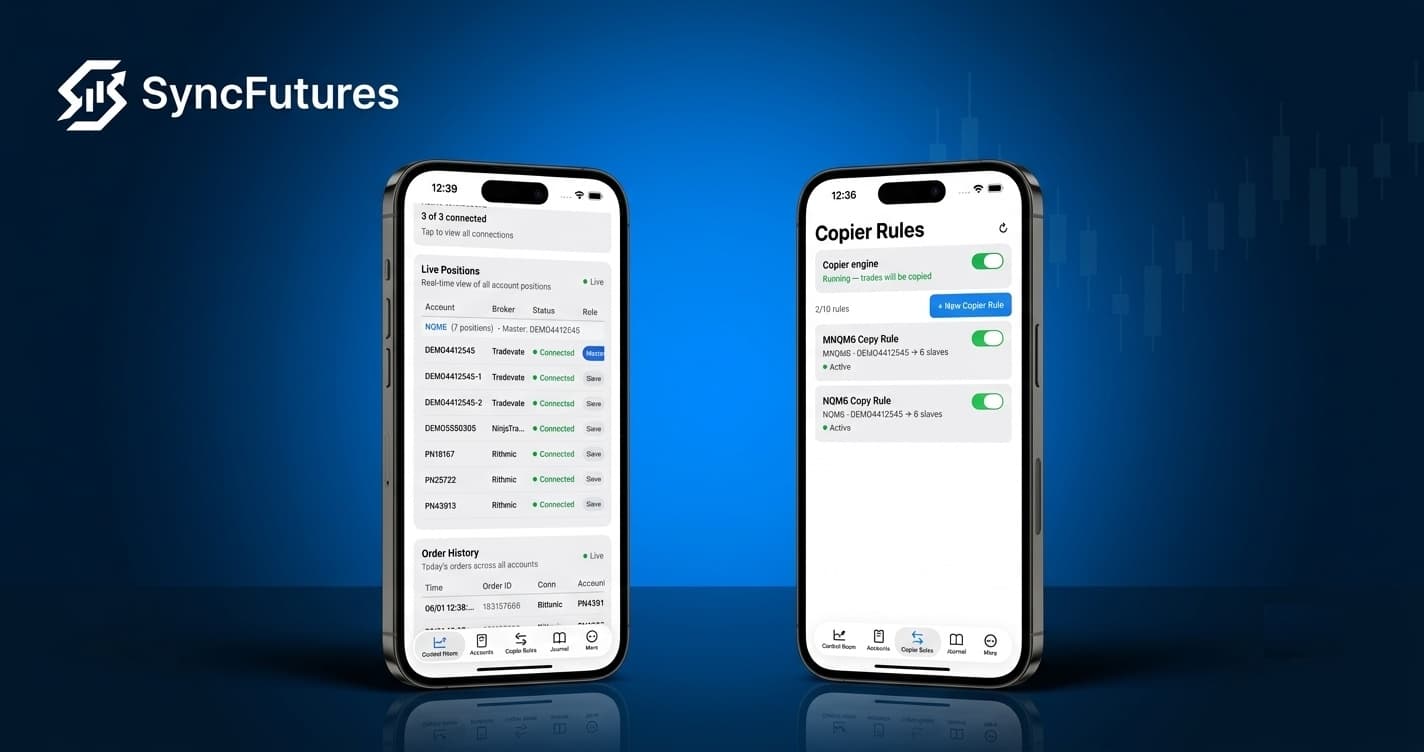
Control Room
The first thing you see after signing in. A live view of every position across every connected account, the order history for the day, your connection statuses, and realized P&L. There's a prominent Flatten All action at the top — the panic button for closing every position across every account at once. (We always recommend confirming an emergency flatten on a second device when possible, but the button is there when you need it.)
Accounts
All your broker connections in one list, grouped by broker. Each one shows live status (connected, reconnecting, or disconnected), the accounts under that connection, and how many of them are active. Tap into any account to drill into per-account positions, orders, and a per-account flatten action. Tap the plus button to add a new broker connection without leaving the app.
Copier Rules
Every copy rule you have is listed with a toggle. Flip a rule on or off with a tap. Tap into a rule to edit the master, the slaves, the contract filters, the multiplier, and the engine on/off state. Add a new rule from this screen too — same flow as the web, just designed for a phone.
Journal
Your trade journal travels with you. Auto-synced trades from every connected broker, with tags, playbooks, and notes you can write from the phone. If you do your trade reviews on the couch instead of at the desk, this is the screen you'll use most.
More
Notifications, settings (biometric unlock, push permissions, sign-out), subscription status, support, and the legal items. Sign-up and billing are intentionally not here — see the next section for why.
Cross-Broker, From Your Phone
This is where SyncFutures Mobile differs from most apps in the futures space. The mobile app is cross-broker because the platform behind it is. Whether your master is on Tradovate and your slaves are spread across Rithmic and NinjaTrader, or you're copying inside a single prop firm's ecosystem, the same app handles all of it. You don't switch apps when you switch brokers.
The brokers currently supported on mobile are the same set as on the web:
- Tradovate — used by Tradeify and many other prop firms that offer Tradovate as a trading platform
- Rithmic — a widely used futures market data and order routing platform, available at many prop firms
- NinjaTrader — connected via Tradovate OAuth, since the two share authentication
- ProjectX — the broker behind TopstepX
Some prop firms support multiple of these brokers and let traders choose at signup, so the exact mapping varies. The relevant point for trade copying is that the SyncFutures app handles all four equally, including copying across them when your master and slave accounts live on different brokers.
If you set up your accounts using our guides for connecting Tradovate and connecting Rithmic, the same connections work on mobile automatically — you don't reconnect anything. Sign in to the app with the same email and the data is already there.
What's Web Only (and Why)
The mobile app deliberately doesn't try to do everything the web does. A few things stay web-only on purpose:
Sign-up and subscription management. Apple and Google's policies around in-app purchases make it complicated to handle subscriptions on mobile when the actual product is delivered through a separate cloud backend. We keep sign-up, plan selection, billing, and Stripe portal access on the web where it's clean.
Affiliate hub and prop firm directory. Two areas of the platform that are more about discovery than action. They work better in a wide layout with rich content.
Deep analytics dashboards. Wide tables and multi-chart layouts that just don't fit a phone screen. Summary stats are on the mobile journal; the deep dive lives on the web.
Everything else — connections, rules, positions, orders, journal entries, notifications, support tickets — is on both. The two surfaces share the same cloud backend, so a change on one shows up on the other in real time.
For Prop Firm Traders Specifically
If you're trading funded accounts, mobile control isn't a luxury, it's a fit-with-real-life feature. A few common situations:
- Traders with multiple funded accounts (across one firm or several). The more accounts you run, the more important it is to be able to act on alerts from wherever you are. The copy engine runs continuously on the cloud, and the mobile app gives you a way to verify it's healthy and intervene if it isn't.
- TopstepX traders. TopstepX is built on ProjectX, which is a first-class broker connection in the SyncFutures app. Sign in once on the web, and the same accounts appear in the mobile app.
- Tradeify traders. Tradeify uses Tradovate as its trading platform. A Tradovate connection on the web carries through to the app without re-authentication.
- Anyone juggling cross-broker accounts. If one of your funded accounts is on Tradovate and another is on Rithmic, no single broker mobile app can connect them. SyncFutures Mobile handles both sides because the copier itself is broker-agnostic.
For an in-depth look at scaling these accounts in practice, our guide to scaling prop firm accounts covers the operational side. The mobile app is the natural extension once you're past three or four accounts and your life starts demanding flexibility.
How to Get the App
The SyncFutures mobile app is included with every active SyncFutures subscription at no additional cost. There's no separate plan, no upgrade required.
- Make sure you have an active SyncFutures subscription. New to SyncFutures? Start with a 7-day free trial on our pricing page.
- Download the app — search "SyncFutures" on the App Store or Google Play.
- Sign in with the same email you use on the web. Your broker connections, copy rules, and journal data are already there.
- The first time you sign in, enable push notifications when prompted so you can be alerted to copy-rule events, copied-order rejections, and support replies.
- Enable biometric unlock under Settings if you want Face ID, Touch ID, or fingerprint protection on every app launch.
The full mobile app overview, including screenshots of every screen, is on our mobile app page.
Getting Started
Trade copying isn't just a desktop activity anymore. The cloud backend was always able to run regardless of where you were sitting — what changed is that you now have a real interface that follows you. Whether you're managing five funded accounts or twenty, whether you're at home or on the road, the same connections, the same rules, and the same flatten button are in your pocket.
If you're not already running a multi-account trade copier and you want to understand the basics first, start with our guide to copying trades across multiple prop firm accounts. If you're ready to try the platform end-to-end, head to our pricing page — every plan includes the iOS and Android app at no extra cost.